All build stories

02 / Production internal tooling / 2026

CreateStory

The first system I shipped had to keep working after I left.

An internal operations platform connecting content crawling, text-to-speech, Google Drive validation, synchronization, and publishing through one operational interface.

Workflow impact

One story used to require many manual handoffs. CreateStory turns it into one tracked job.

A new operator can follow the same four stages every time, see where each story is, and recover a failed step without reconstructing the whole process.

Story URL or batchOne tracked jobContent and audio ready
Before CreateStory

The operator was the workflow

They moved every story between separate tools and personally remembered what had finished, what had failed, and what came next.

Source sites
Chapter files
Drive folders
CMS updates
Audio queues
When something failed, the operator had to find the stopping point and decide what was safe to run again.
One workspace replaces the handoffs
With CreateStory

Four stages, visible from one workspace

CreateStory keeps the story, chapters, sync state, and audio progress together.

1 / CollectPaste one story URL or start a batch crawl
2 / PrepareCrawl, normalize, and validate the chapters
3 / DeliverSync Drive and update the story content
4 / CompleteGenerate missing audio, monitor, and retry
One place to startEvery stage has a statusErrors stop before publishingJobs can resume
What became lighterLess tab-switching and repeated checking. A new operator can see what happened, what is running, and what needs attention.

The diagram is simplified for a first-time reader. The approved product views below show how these stages appear in the real tool.

RolePrimary developer during internship
StatusHanded over
Period2026
StackReact · TypeScript · FastAPI · PostgreSQL · Docker · Google Drive API · Cloudflare

01 / Context

The workflow crossed more systems than one operator should have to remember.

Content moved through source websites, chapter files, Google Drive folders, a story backend, audio generation, and publishing status. The challenge was not one isolated algorithm; it was making a long-running, failure-prone workflow understandable from one place.

CreateStory grew during my internship from a development task into an internal operations platform deployed on a company-controlled Windows host.

02 / My role

I worked across the interface, service boundaries, deployment, and handover.

I developed the React and TypeScript operations interface, connected it to a FastAPI gateway and worker services, evolved crawling, Drive synchronization, TTS, and auto-audio workflows, and diagnosed failures across frontend, database, service, and external API boundaries.

I also performed controlled updates on the company host and wrote separate management and operations documents so another developer could continue without depending on my access.

03 / Architecture

Service boundaries followed different failure and resource profiles.

A same-origin React application communicates with a central FastAPI gateway. Behind it, crawler, text-to-speech, Drive synchronization, and auto-audio services own their workflows and protected internal APIs.

Crawler jobs depend on external pages and browser sessions. TTS is CPU-intensive. Drive synchronization has a different credential and network profile. Separating them reduced the chance that one failed worker stopped every other operation, even though production still ran on one physical host.

04 / Production reality

A passing build was only the beginning of a safe update.

Production did not have complete CI/CD. Before an update, I checked for active crawl or audio jobs, prepared an export, transferred it to the host, rebuilt or restarted the affected containers, and smoke-tested the changed workflows.

That experience changed my definition of done. A system must be operable, diagnosable, recoverable, and transferable—not merely functional on a development machine.

05 / What shipped

Operators gained one surface for a fragmented production workflow.

The deployed tool supported crawling and inspecting content, monitoring long-running jobs, generating chapter or story-wide audio, validating content before synchronization, creating or updating stories through a controlled queue, and detecting missing audio.

I do not publish productivity numbers because I no longer have the company analytics required to verify them. The evidence I can defend is the deployed workflow, the operational responsibility, and the completed handover.

06 / Public boundary

The public version will be a reconstruction, not a copy of company production.

Any portfolio demo will use synthetic stories, personal test folders, non-production credentials, and generic service labels. It will not include company stories, accounts, tokens, Drive identifiers, internal logs, analytics, endpoints, or production screenshots.

A local source copy is not permission to publish company data. The case study documents my contribution while keeping the operational environment private.

07 / Lessons

Shipping taught me to look beyond the feature I was implementing.

Long-running jobs need persistence, visibility, and cancellation behavior. Deployment risk depends on operational state. Secrets and backups are part of system design. Documentation becomes part of the product when someone else must take over.

The stack also had real limitations: one Windows host, manual production updates, limited centralized monitoring, and incomplete automated rollback. Recognizing those limits is part of the production experience I am taking forward.
System view

A simplified architecture from the interface to the services behind it.

This intentionally describes boundaries without exposing credentials, internal hostnames, or company identifiers.

01React + Nginx
02FastAPI gateway
03Domain services
04PostgreSQL
05Drive / CMS

Evidence snapshot

What this story can honestly support.

EnvironmentCompany production host
DeliveryManual controlled updates
OperationsPersistent background jobs
Final outputTechnical handover

Product evidence

The four workflow stages are visible in the actual operations interface.

Collect, Prepare, Deliver, and Complete each have a dedicated view. Open any screenshot to inspect the product at full size.

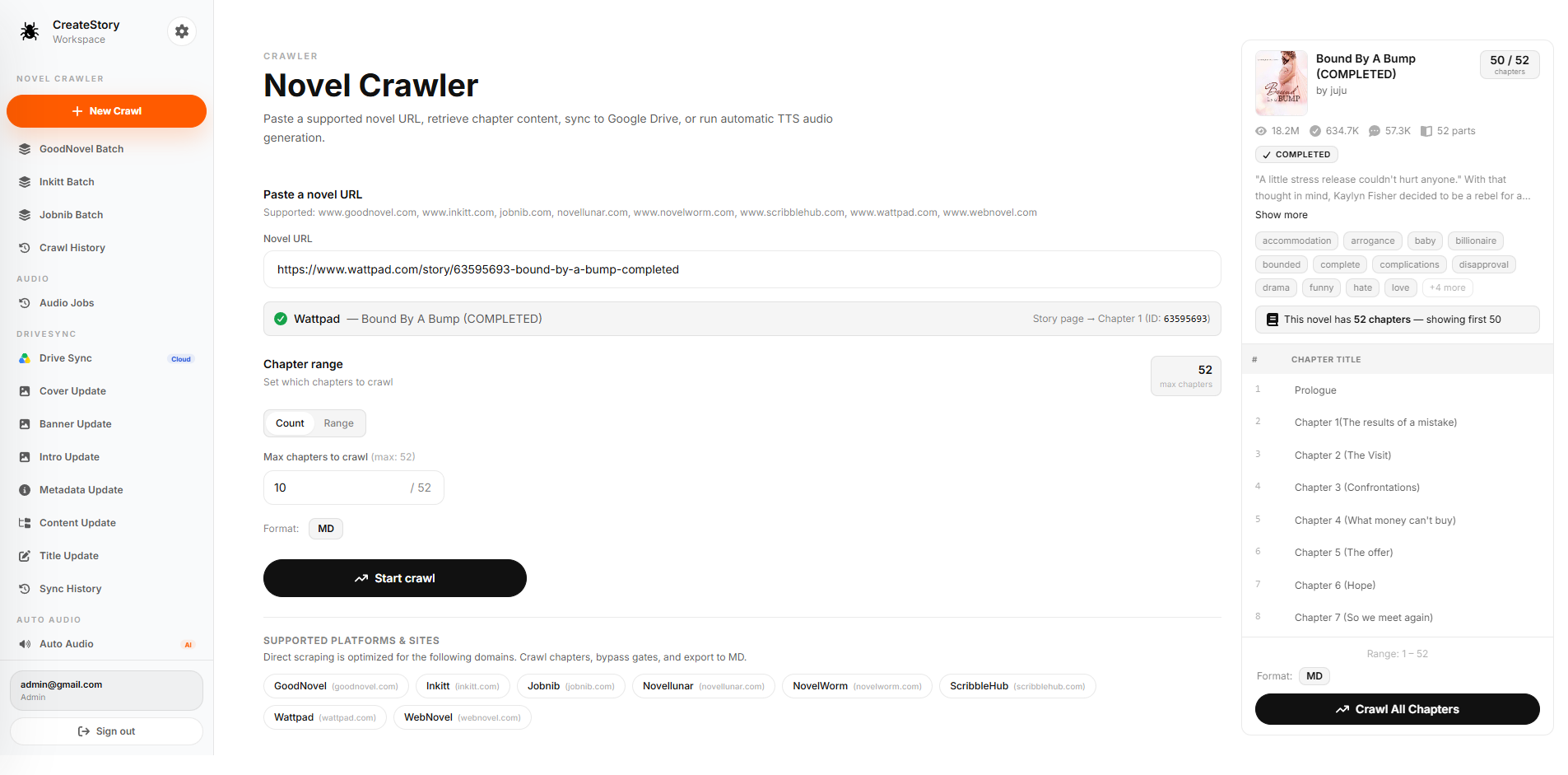
CreateStory Novel Crawler showing a story URL, chapter range controls, and a detected chapter listOpen full image

Production product view

1 / Collect: start with one URL or a batch

Operators can paste a supported story URL, inspect the detected chapters, and choose the crawl scope before starting.

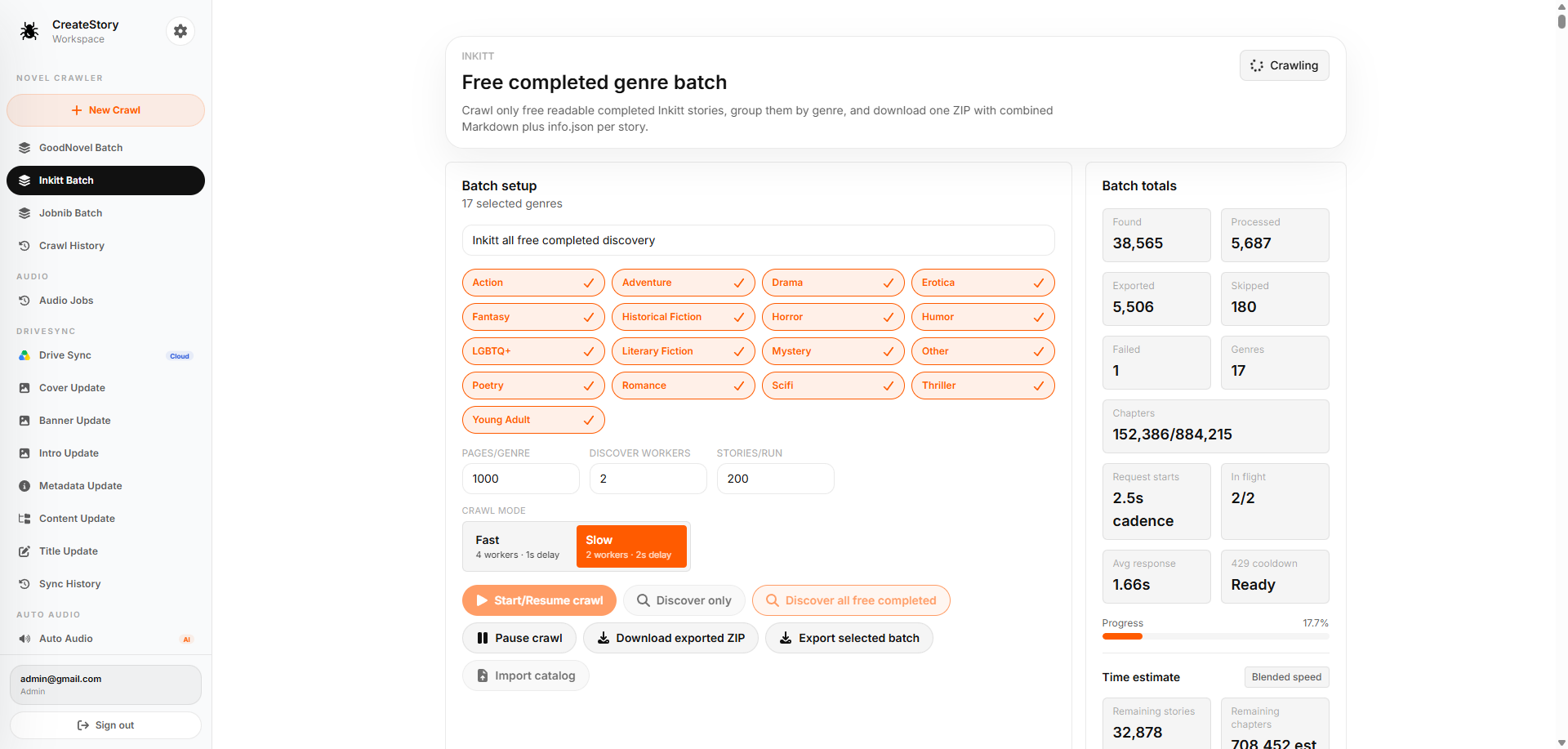
CreateStory batch crawler showing genre selection, controls, progress, and processing totalsOpen full image

Production product view

2 / Prepare: process discovery work in batches

Genre selection, crawl controls, totals, progress, and time estimates stay visible while a large batch is processed.

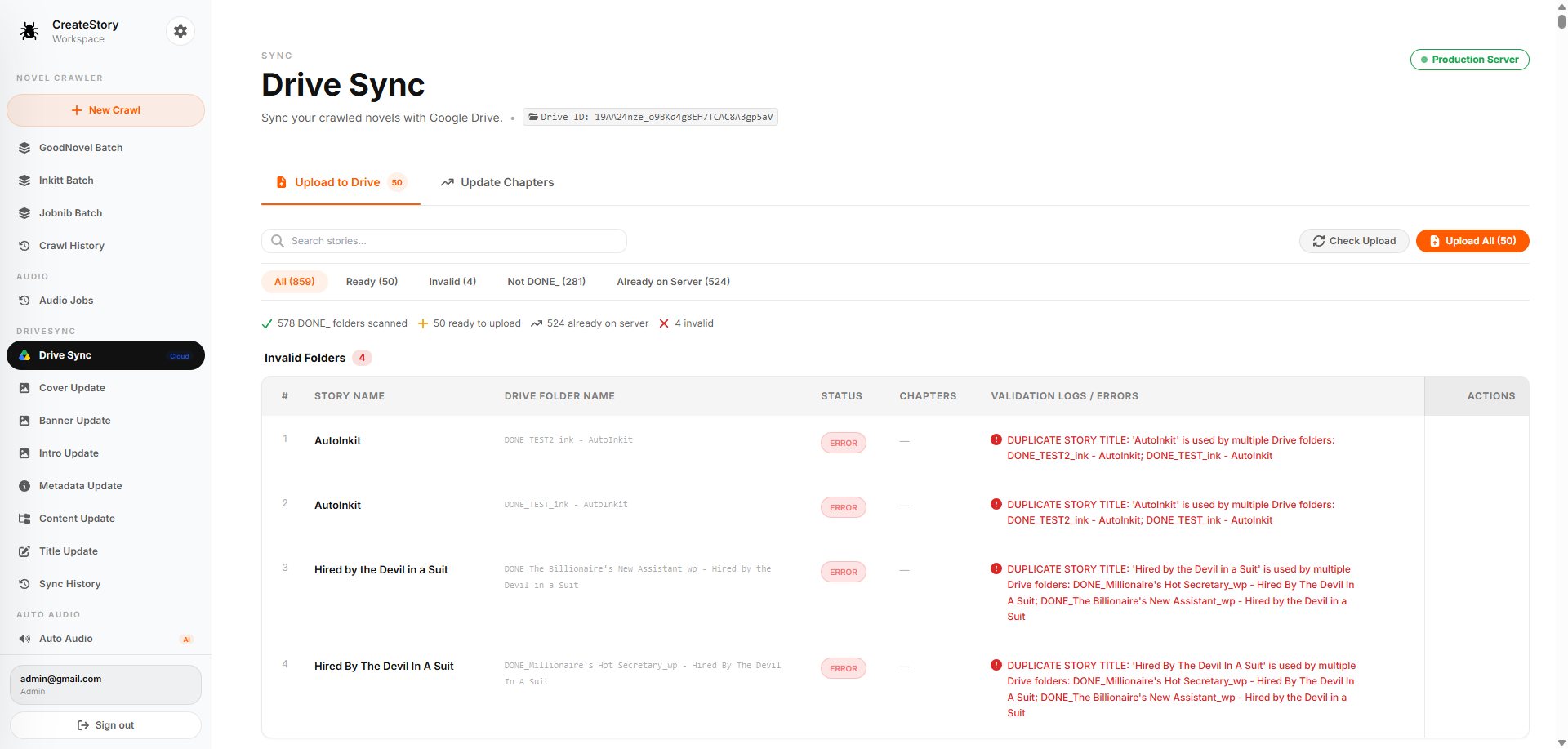
CreateStory Drive Sync showing story states and validation errors before uploadOpen full image

Production product view

3 / Deliver: validate before synchronizing

The Drive workflow separates ready, invalid, and already-synchronized stories, with actionable validation errors before upload.

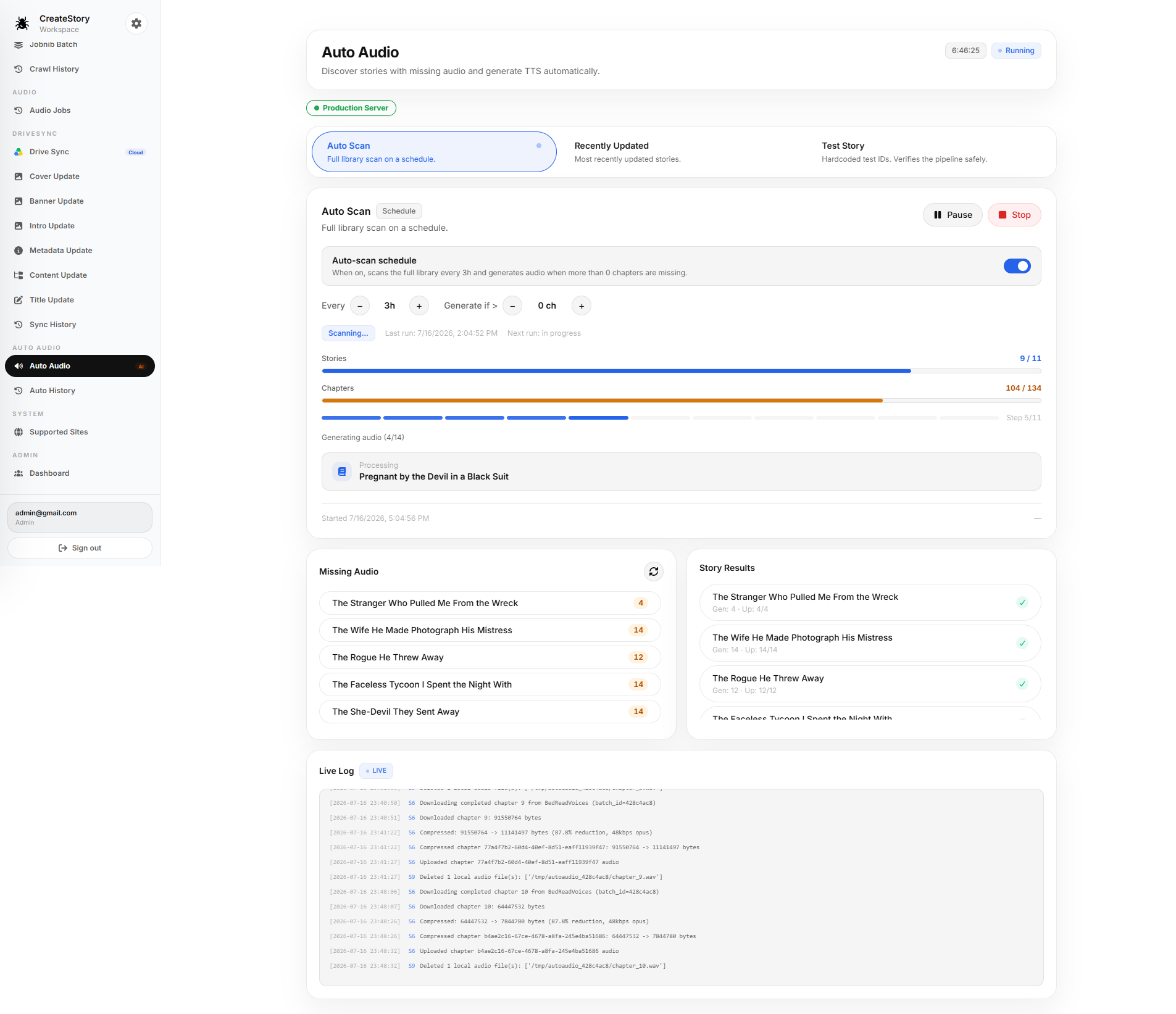
CreateStory Auto Audio showing scheduled scanning, progress, story results, and live logsOpen full image

Production product view

4 / Complete: monitor long-running audio work

Scheduled scans, chapter progress, missing audio, completed stories, and live logs make the audio pipeline observable.

Public portfolio rule

Prove the work without exposing the environment.

The product screens on this page were reviewed and approved for public use. Credentials, tokens, private endpoints, and company-only source code remain outside the portfolio.

Next build story

Skeleton Survivors